VLANs
This page provides a granular view of the VLAN configuration across your network. Currently, it lists every VLAN instance detected on every interface, allowing for a precise audit of network segmentation and port configurations.
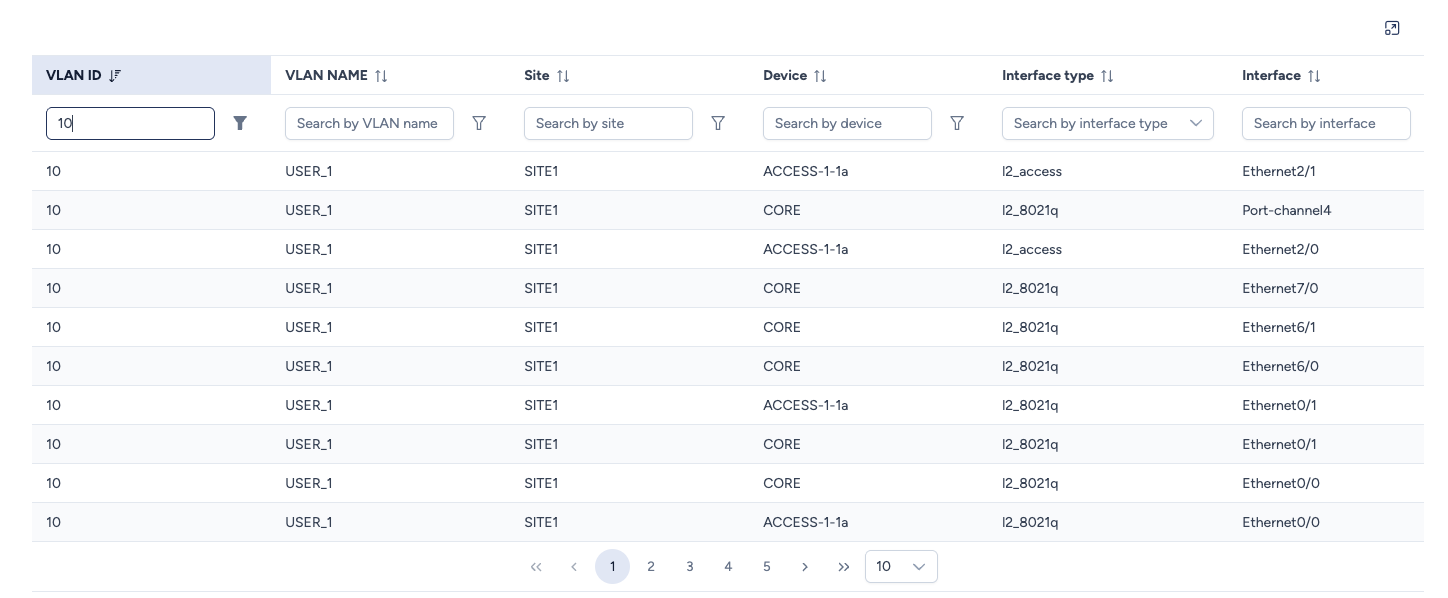
VLAN List details
The table breaks down the configuration by interface:
- VLAN ID: The numeric identifier of the VLAN.
- Special Case: You may see a VLAN ID named "all". This is a specific Avalon convention to model Trunk ports that are configured to allow all VLANs indiscriminately (e.g.,
switchport trunk allowed vlan all).
- Special Case: You may see a VLAN ID named "all". This is a specific Avalon convention to model Trunk ports that are configured to allow all VLANs indiscriminately (e.g.,
- VLAN Name: The label configured on the device (e.g.,
USER_1,VOIP). - Site: The location where this VLAN exists.
- Device: The specific equipment hosting this configuration.
- Interface: The physical or logical port name (e.g.,
Ethernet0/0,Port-channel1). - Interface Type: The category of the port in Avalon's data model (see definitions below).
Understanding Interface Types
Avalon categorizes interfaces based on their logical function (L2 switching vs. L3 routing). You can filter the list using these specific types.
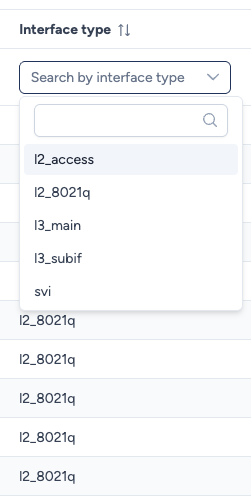
- l2_access: A standard Layer 2 "Access" port. It carries traffic for a single VLAN (untagged) and is typically connected to end devices (PCs, Printers).
- l2_8021q: A Layer 2 "Trunk" port. It uses 802.1Q tagging to carry multiple VLANs. These are typically uplinks between switches or connections to hypervisors/APs.
- svi: Switch Virtual Interface (or VLAN Interface). This is a logical Layer 3 interface associated with a VLAN, often serving as the default gateway.
- l3_main: A physical Routed Port. This interface acts as a Layer 3 boundary directly (no switchport) and does not belong to a traditional L2 VLAN context.
- l3_subif: A Layer 3 Sub-interface. A logical subdivision of a routed port, usually tagged with a specific VLAN ID (e.g.,
Gi0/0.10), often used for "Router on a Stick" configurations.
Viewing Options
- Filtering: Use the search bars at the top of each column to quickly find where a specific VLAN (e.g., ID
10) is deployed or to list all Trunk ports (l2_8021q) on a specific switch. - Full Screen Mode: Click the Expand icon (top-right corner) to maximize the table for easier browsing of large datasets.
Roadmap: Aggregated View
Currently, this view focuses on interface-level details. A future update will introduce an aggregated Site View, listing unique VLANs defined per site without the interface-level noise, to simplify high-level management.