LDAP
This page allows you to configure an external LDAP server (like Active Directory or OpenLDAP) to authenticate users in Avalon.
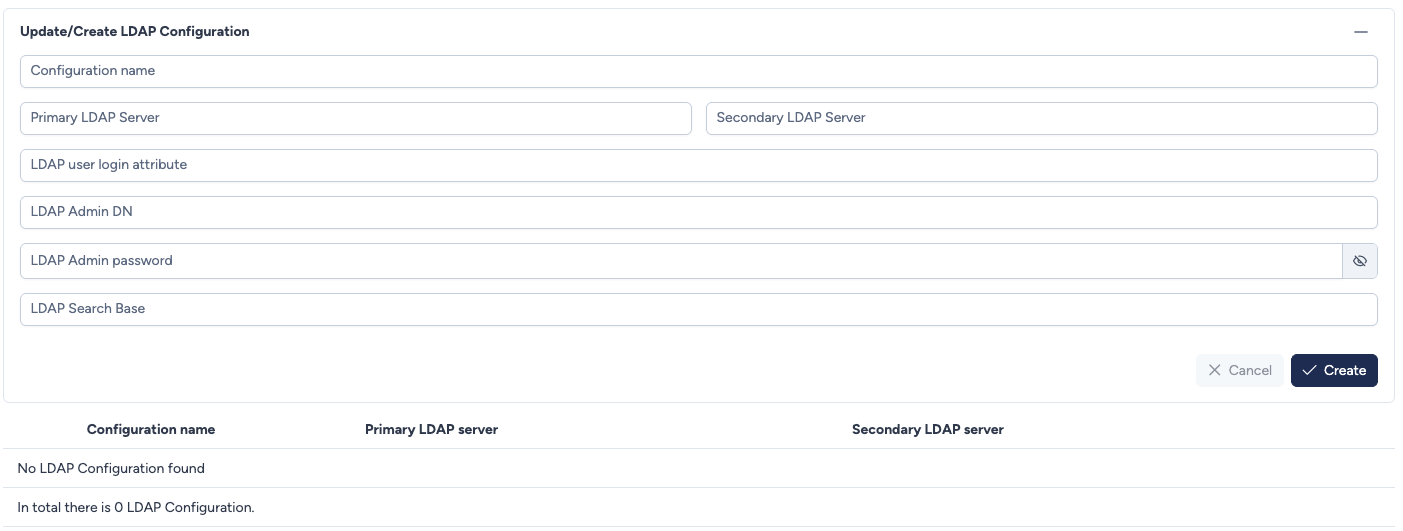
Configuration parameters
The form requires specific details about your LDAP infrastructure to establish a connection.
- Configuration name: A unique name to identify this LDAP configuration within Avalon.
- Primary LDAP Server: The IP address or FQDN of your main LDAP server.
- Secondary LDAP Server: The IP address or FQDN of a backup LDAP server (optional for redundancy).
- LDAP user login attribute: The attribute used to identify users during login (e.g.,
uid,sAMAccountName,cn). - LDAP Admin DN: The Distinguished Name (DN) of the service account used by Avalon to browse the directory (bind user).
- LDAP Admin password: The password associated with the Admin DN account.
- LDAP Search Base: The location in the directory (Base DN) where Avalon should start searching for users (e.g.,
ou=users,dc=example,dc=com).
Security
The LDAP Admin password is masked by default. Click the eye icon to reveal it.
Actions
- Cancel: Discards the current entry.
- Create: Validates and saves the new LDAP configuration.
Existing Configurations
Below the creation form, a table displays all currently configured LDAP connections.
- Configuration name: The name given to the configuration.
- Primary LDAP server: The main server address configured.
- Secondary LDAP server: The backup server address (if defined).