Redundancy Groups
This page allows you to manage Redundancy Groups.
In Avalon, a Redundancy Group is a logical attribute stored in the database, completely independent of the underlying hardware configuration (such as native stacking, VSS, or MC-LAG).
It allows you to manually tag devices that share a redundancy relationship to enforce safety rules during automation workflows.
Operational Impact: Safety Mechanisms
The primary purpose of this feature is to act as a safety constraint for the automation engine.
Prevention of Simultaneous Upgrades: Avalon uses this database record to strictly prevent simultaneous critical operations (such as firmware upgrades) on devices belonging to the same group. This ensures that at least one member of the pair remains operational while the other is being processed.
Group List details
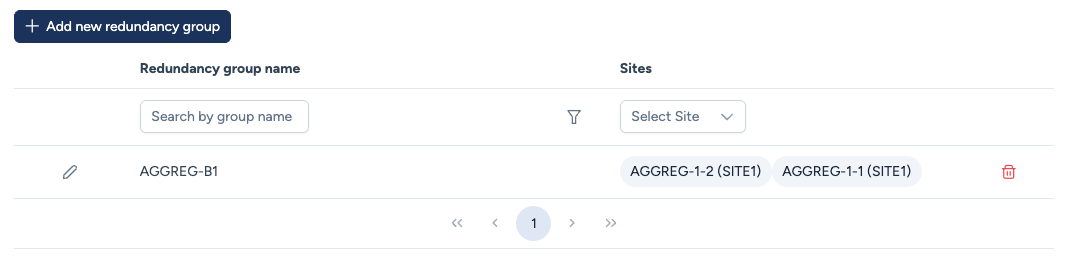
The table displays the configuration of these logical associations:
- Redundancy group name: The unique identifier defined for this group (e.g.,
AGGREG-B1). - Sites / Members: Lists the physical devices included in the group.
- Note that each member is displayed with its associated Site (e.g.,
DEVICE-NAME (SITE-NAME)). - A single Redundancy Group can technically include devices located in different sites (Geo-Redundancy).
- Note that each member is displayed with its associated Site (e.g.,
- Actions:
- Edit (Pencil): Enters the inline editing mode to add or remove members.
- Delete (Trash): Removes the logical grouping from the database. This does not delete the physical devices from the inventory; they simply revert to being treated as completely independent units.
Creating and Editing Groups
You can define new groups by clicking + Add new redundancy group or modify existing ones using the edit icon.
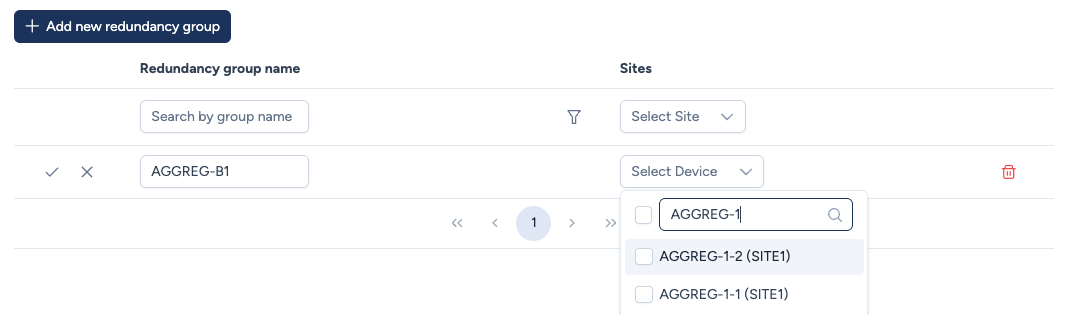
Configuration process:
- Name: Define a unique label to identify the group.
- Device Selection: Use the dropdown menu to search and assign members to the group.
- Logic: You can select two or more devices.
- Constraint: A device can typically belong to only one redundancy group. Only devices not currently assigned to a group will appear in the search.
- Validation: Click the Check icon to save the changes.
Roadmap
Multi-site Topology Visualization: While the Inventory allows defining Redundancy Groups that span across multiple physical sites (Geo-Redundancy), the Topology Map currently displays the network on a per-site basis. Consequently, multi-site groups will not yet appear as a single unified node in the graphical view. Support for multi-site visualization is currently under development.