Overview page
This page provides a comprehensive list of all configured Network Maps. In Avalon, a "Map" corresponds to a Site in the data model, serving as a container for your network devices, buildings, and topologies.
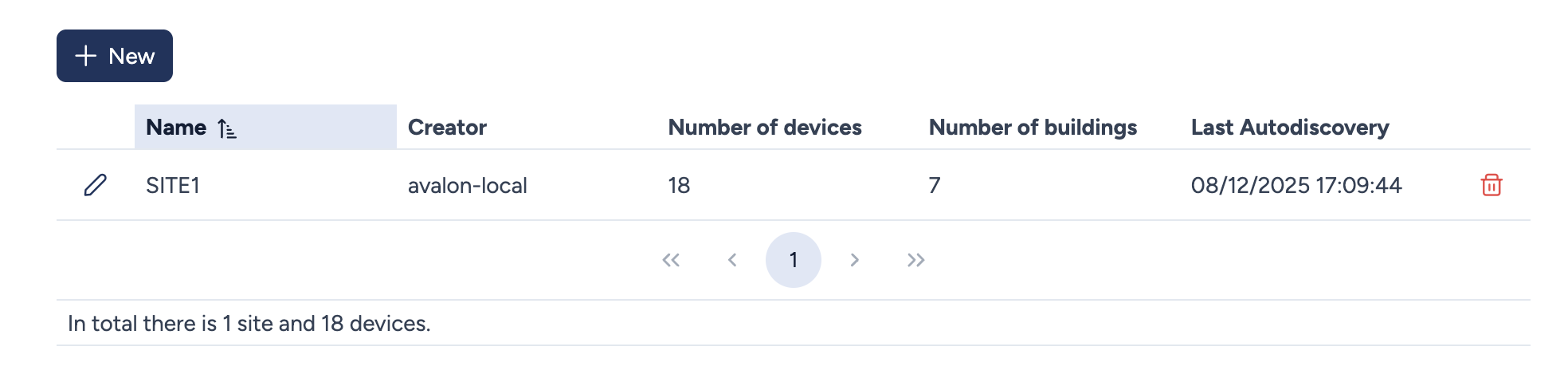
Maps list details
The main table displays an overview of all existing sites with the following key metrics:
- Name: The unique name assigned to the site. You can click the column header to sort the list alphabetically.
- Creator: The username of the person who originally created the site.
- Number of devices: The total count of network devices currently assigned to this site.
- Number of buildings: The number of physical buildings defined within the site.
- Last Autodiscovery: The date and time of the last successful discovery process run on this site.
Actions
You can perform the following actions to manage your sites:
- New: Opens the creation form to define a new Map/Site.
- Edit (Pencil icon): Opens the configuration parameters for the specific site (e.g., to rename it).
- Delete (Trash icon): Permanently deletes the site.
- Navigation: Clicking on a site row navigates to that site's specific dashboard and topology view.
Global Stats
A summary at the bottom of the page displays the total count of sites and devices managed across the current tenant.