ZTP
This dashboard provides a real-time view of all devices currently undergoing the Zero Touch Provisioning (ZTP) process. It allows operators to monitor progress, validate identities, and resolve blocking issues such as serial number mismatches.

Status Indicators
The table tracks the two critical stages of the onboarding workflow:
-
Conf Min (Minimal Configuration):
- Not Loaded (Red): Avalon has not yet generated the configuration files (check if the device model is correct or if the DHCP server is running).
- Loaded (Green): The DHCP binding is ready, and the minimal configuration file is available on the TFTP server.
-
Serial (Identity Check):
- Not Checked (Red): The device has not yet contacted Avalon. It might be powered off, cabling might be wrong, or the DHCP Relay is not functioning.
- Mismatch (Red): The device contacted Avalon, but the Serial Number it presented does not match the one expected in the database.
- Checked (Green): The device is authenticated and has successfully retrieved its configuration.
Handling Serial Mismatches
A "Mismatch" alert is common when a dummy serial number was used during the initial declaration.

Resolution Workflow:
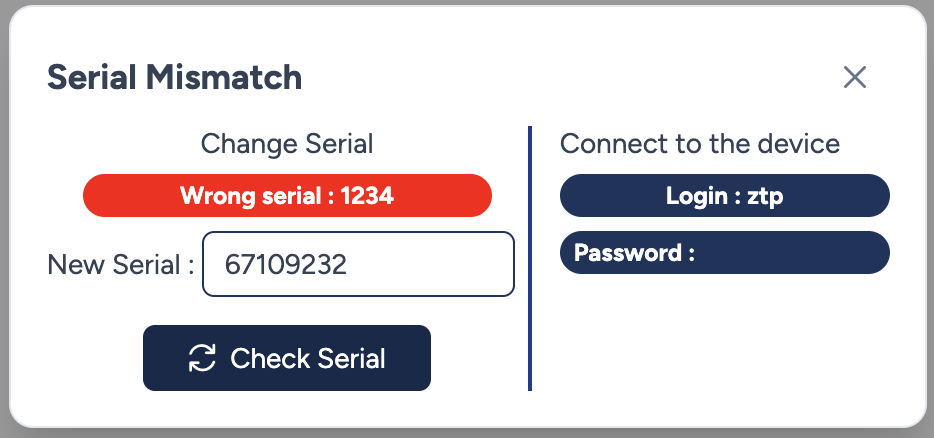
- Click the Gear icon next to the "Mismatch" badge.
- A modal opens, displaying the Wrong serial (the actual serial number detected on the network).
- Update: Copy the detected value into the "New Serial" field.
- Click Check Serial to update the database and authorize the device.
Troubleshooting Access
If the process is stuck and you need to log into the device via console or SSH to investigate, the mismatch modal displays the Local Credentials (Login/Password) that were temporarily pushed to the device via the minimal configuration.
Finalization
Once the serial is validated, the status turns green.

- Conf Final (Push): This action triggers the deployment of the full production configuration (interfaces, routing, security policies).
Roadmap
The automated generation and push of the Final Configuration is currently under development (Target: S1 2026). In the meantime, the "Push" button may be disabled or limited to specific templates.