SMTP
This page allows you to configure the connection details for an external SMTP (Simple Mail Transfer Protocol) server. This configuration is vital for enabling email-based features across Avalon.
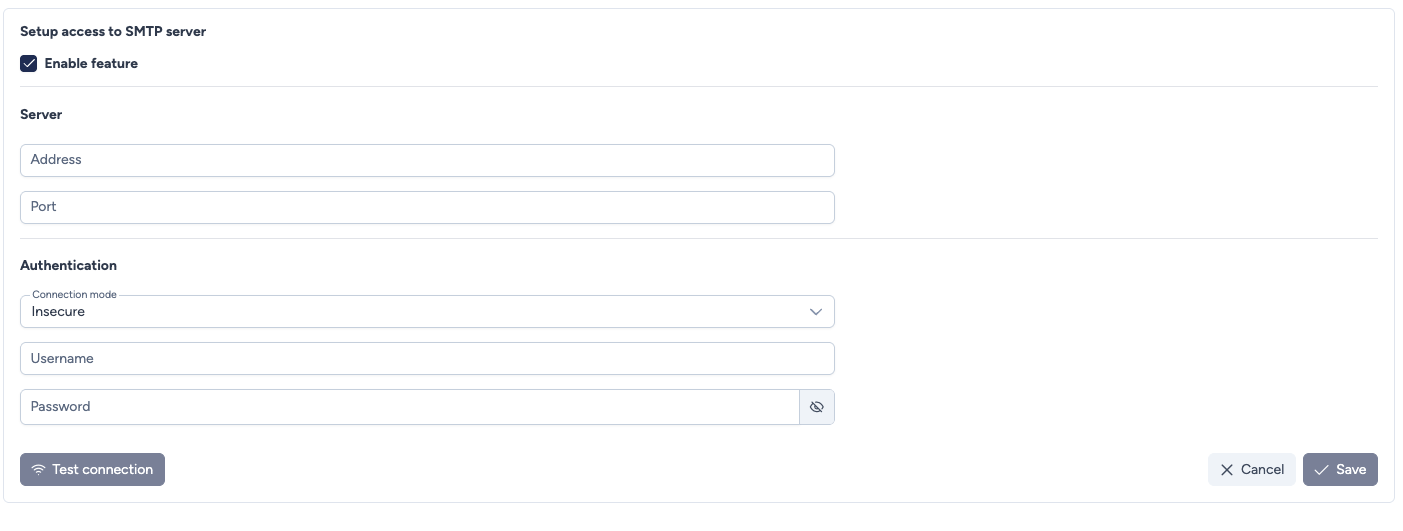
Configuration parameters
This section defines feature activation, server connection, and authentication details.
- Enable feature: Checkbox to activate or deactivate the use of the configured SMTP server throughout the application.
- Address: The IP address or FQDN (Fully Qualified Domain Name) of the SMTP server host.
- Port: Port used to establish the SMTP connection.
Common values:
25(insecure or local relay)465(SSL)587(TLS)
- Connection mode: Specifies the security protocol to use:
- TLS (recommended for most servers)
- SSL (legacy secure mode)
- Insecure (no encryption)
- No authentication (useful for trusted relay servers)
- Username: The username required to authenticate with the SMTP server.
- Password: The password associated with the provided username.
Security and Delivery
For production environments, we highly recommend using TLS or SSL. Many external mail providers (like Gmail or Microsoft 365) reject insecure connections.
Actions
- Test connection: Highly recommended. Attempts to connect to the SMTP server using the provided settings and usually sends a test email to confirm functionality.
- Cancel: Discards any unsaved changes and exits the setup.
- Save: Saves the connection and authentication parameters for the SMTP server.